
When editors attempt to add button-style links to PDF or media files in Drupal (via the LinkIt tool and CK Editor), the generated links return a 404 error when clicked. This occurs even when both the page and the media file are published, and the correct media reference is selected through the UI.
TL;DR
This is a known bug with the LinkIt tool in Drupal. Instead of using the media picker, navigate to /admin/content/media, open the file in your browser, and paste the full URL of the file from the address bar into your link field.
Affected Areas
- Button links to media files (explicitly formatted as buttons)
- Profile list links (where blue button formatting is automatically applied)
- Potentially, other contexts where the LinkIt tool is used to reference media
Root Cause
This is a known bug in the LinkIt and CK Editor tools within Drupal. The tools incorrectly resolve the media reference URL when styling is applied, resulting in a path that doesn’t route to the published file.
Workaround: Direct URL Method
Steps
- Navigate to
/admin/content/mediain the Drupal backend - Locate the media file you need to link to
- Click on the file to open it in your browser, or copy the URL from your browser's address bar."
- Copy the fully resolved URL that appears when the file loads in the browser
- Important: Use the direct file URL, not the media reference URL
- Paste this URL directly into your link field instead of using the media picker dropdown
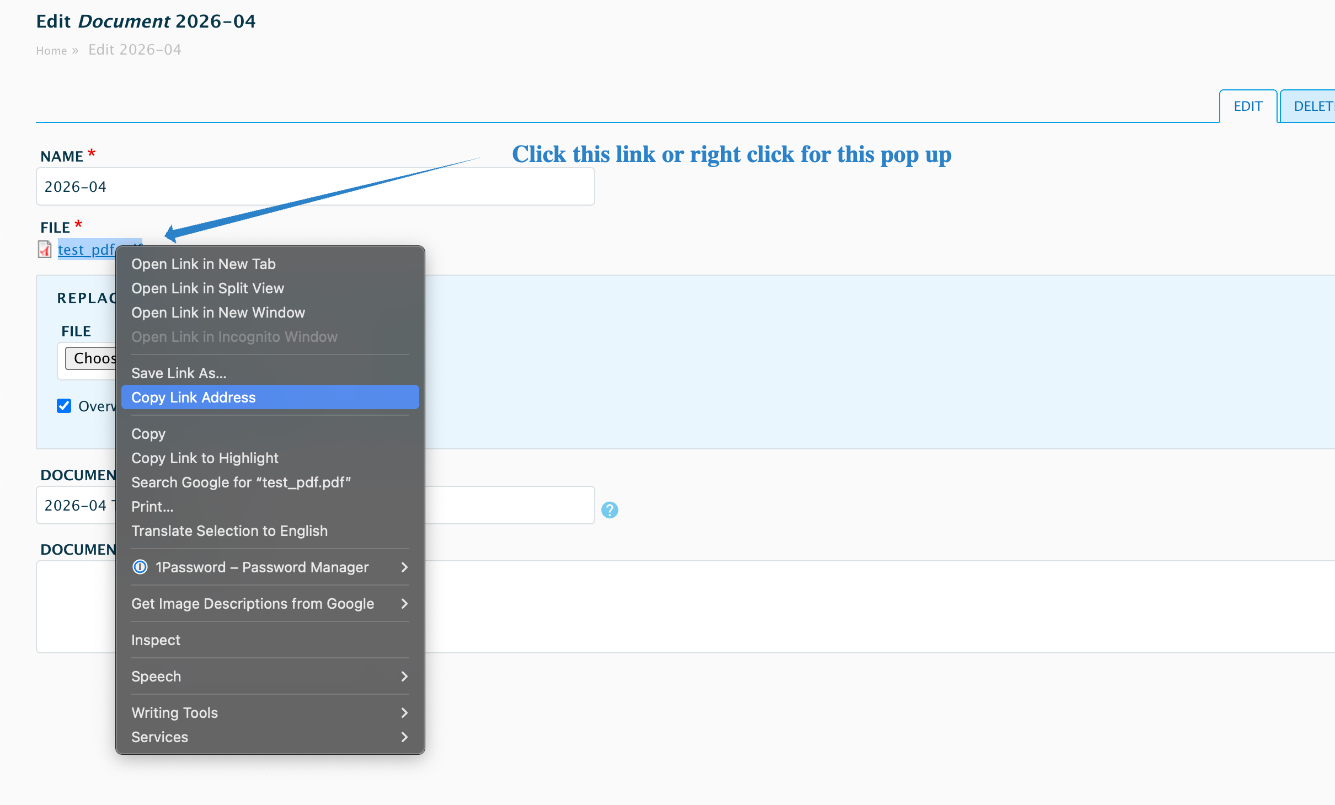
Click on the image to zoom in.
Example
- ❌ Media reference:
https://publichealth.jhu.edu/media/164846/ - ✅ Resolved file URL:
https://publichealth.jhu.edu/sites/default/files/2026-04/my-document.pdf(actual file path)
When to Use This Workaround
- Creating buttons that link to PDFs or documents
- Adding links to files in profile list components
- Any context where the LinkIt tool is selecting media but generating 404 errors
Best Practices
Interface Considerations
For most use cases where you’re essentially linking to files rather than triggering actions, consider whether links are more semantically appropriate than buttons. This may improve UX clarity for users.
If a standard link is suitable, the typical workflow and ready-to-use links to document media will be fine. It's only when a button is called for. Only the modified link introduces this bug.
Future Resolution
This is a known Drupal core issue with LinkIt and CK Editor. A permanent fix is pending Drupal updates but there is no clear or fixed timeline. In the interim, the workaround above is reliable.
Related Articles
Support
If you encounter this issue or have questions about the workaround, contact the BSPH Web Team at support@jhsph.freshdesk.com