
Archiving is the recommended alternative to deleting content. It removes content from public view but keeps it for potential recovery.
Requesting Content Archiving
Content editors can request content archiving,
- Go to Edit the content you want to archive
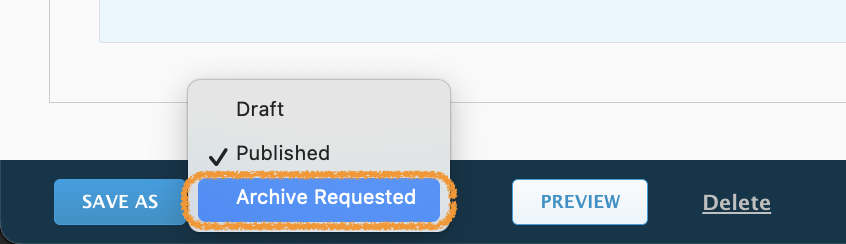
- Change its state to "Archive Requested".
- Explain the reason in the log message.
Content will not be archived without a valid reason note in this log.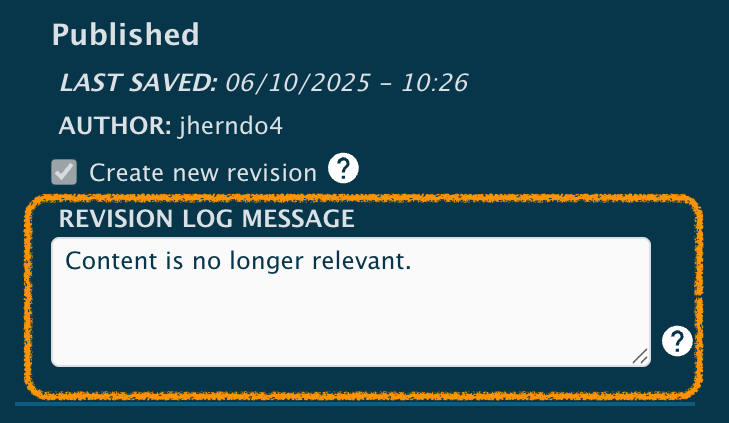
- Save your changes. Once an archive request has been made, no additional changes should be made to the content.
Your content will be submitted for review and will remain publicly available until a reviewer takes action. For urgent requests, Communications Associates may reach out to the moderation team via email bsph-web-review@jh.edu.
Recovering Archived Content
Archived content can be recovered by content editors who have access to that content (usual permissions will apply).
- Go to Edit the content you want to recover.
- Change its state to "Draft".

- Save your changes
- Edit as needed and submit for Review and Publishing.
Saving as a Draft creates an editable version but it will need to undergo the moderation process before it's publicly available again.
For Content Reviewers and Moderators
This portion of this article requires a user with the Site Editor role. If you don't have this capability, you will NOT be able to make the necessary changes.When a content state is saved as "Archiving Requested", it will appear in the content moderation queue for review:
- Review the content to ensure it is no longer needed publicly. Content remains publicly available while in the "Archive Requested" state.
- The content state should be "Archived." If this is not appropriate, you can switch the state to "Draft."
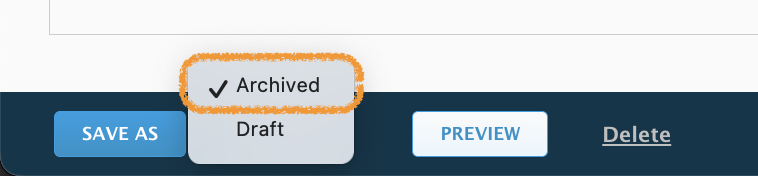
- Save. This is the final step and makes the content inaccessible to the public.
Additional notes
- Once an archive request has been made, no additional changes should be made to the content. For this reason, the only available changes from "Archive Requested" are:
- Save as "Archive" - complete the request and take the content offline
- Save as "Draft" - work can continue on the content.
- If archiving is not necessary, or if the request was mistaken, the content should be returned to "Draft" and then submitted to Workflow to reinstate the "Published" state
- Content should not be left in "Draft" unless there are pending changes still to be addressed.
Learn more about content moderation states →